
MyClass
VIP Upgrade
Or read on to find out more about MyClass and MyClass VIP.
WizTeach > MyClass Upgrade
WizTeach users, we’re delighted to offer you a free licence for MyClass VIP!
Qwizdom was acquired by Boxlight in 2018 and the same team which brought you Qwizdom WizTeach and Qwizdom OKTOPUS now brings you MyClass by Boxlight.
MyClass is a web-based student engagement platform which helps to revolutionize your interactive teaching experience with real-time collaboration, intuitive tools, comprehensive content and games libraries, and robust formative assessment capabilities.
You can also install MyClass on your Android panel and optionally set it as your main home launcher. It seamlessly fits into your classroom, giving you instant access to your lessons as soon as you turn on your screen.
Why Should I Use MyClass?
It can be a challenge to keep students engaged and on task, especially when everyone cannot always be in the same room at the same time. MyClass empowers learning and helps educators effectively drive participation and collaboration in all settings. Deliver interactive content and enhance your existing lessons with videos, animations, questions, interactive activities, and more. Students can view and interact with content inside and outside of the classroom, allowing remote students to collaborate with their classmates and access instructional materials.
Full-Featured Whiteboard
Everything you expect in a quality whiteboard. Annotations, text, shapes, and online image search.

Organize and Share Easily
Keep everything organized in the My Lessons area with Folders, and share with other teachers.

Interactive Activities and Games
Create interactive sorting, drag and drop, matching activities, and more.

Premade Content
Over 10,000 lessons, activities, and games makes our platform click-play ready.

True Collaboration
Connected students can be invited to share their ideas for other students to view in real-time.

Assessment and Reporting
Review feedback in-class immediately to adjust instruction to meet students needs.
Teach and Play the MyClass Way
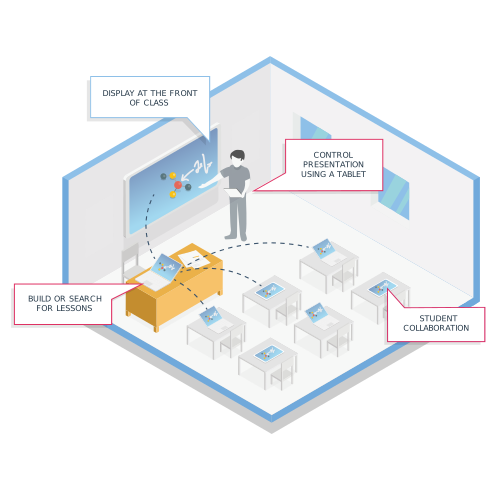
Whether you prefer to teach from your desk, front-of-class panel, or you prefer to roam around the room, MyClass caters to all teaching styles. Log in on multiple devices, and display the same synchronized content everywhere.
An auto-join mode means presentations started from your desk will automatically start on your MyClass Android app, allowing your class to see everything you are doing, no wires attached. Walk freely around your classroom with a tablet in your hand, discretely viewing responses and student work, giving direct attention to the students who need it.
Present lessons as teacher-led, where you are in controlled, or as a self-paced lesson so students can work through problems at their own pace.
MyClass VIP Invitation for Qwizdom WizTeach Users
Our VIP licence includes several upgraded features and improvements to the free version, including:
-
- More storage
- View student work in real time
- Control / manage session from a secondary device
- Share Live Camera / Document Camera While Presenting a Lesson
- LMS integration (teacher sign-in)
- Professional development view for teachers
- Admin Portal for user and license management
- VIP ticket support
*Boxlight acquired Qwizdom in 2018.


Download WizTeach 3
We are still pleased to provide download links to the Windows and Mac versions of WizTeach. We are no longer offering trials, so you will need an existing license key.
Getting Started with MyClass
1. Sign Up & Log In
Log into MyClass on your computer at JoinMyClass.com, connected display, and even directly on your Android panel as an app.

2. Create Content
Create content using the whiteboard, or choose from 10,000+ pre-made lessons and other activities, or import content from other applications. Whiteboard tools and widgets help to create engaging lessons for students.

3. Present
Present your lesson and optionally allow students to join on their own devices to take private notes, collaborate with others in the classroom, share content, respond to questions, and view everyone’s work at the same time.

4. Increase Student Engagement
Turn your activities into games that can be played independently or as a class. Lock student screens and redirect the attention to the front of the room. Increase engagement with interactive questions like sorting, drag & drop, and more.

NEXT STEPS:
- Contact Us using the form below to receive your FREE upgrade license
- Visit https://joinmyclass.com and register for your free account while you wait
- Learn more about MyClass at Boxlight.com